


Zedge™ Wallpapers & Ringtones
4.7952.26K Reviews
App Specs
- Version
- 9.40.1
- Updated On
- License
- Free
- Downloads
- 500,000,000+
- Developer
- Zedge
- Categories
- Personalization
- Platform
- Android, iOS
Screenshots
 Analysis by AppCompare
I’ve found the most useful way to think about Zedge is as a place to change the small details that make a phone feel personal: the image you see whenever you wake the screen and the sounds that call for your attention. That focus suits anyone who likes refreshing a device without changing how they use it. The app is free to start, although in-app purchases range from $0.49 to $399.99 per item, so I’d pay attention to what a particular purchase offers before buying.
One destination for visual and sound changes
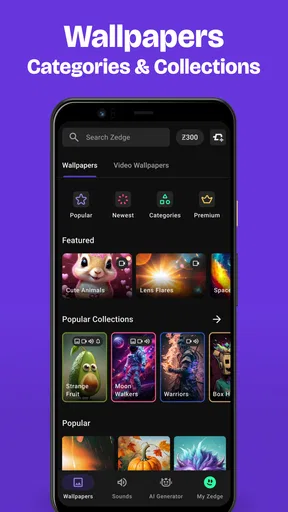
Zedge™ Wallpapers & Ringtones is a personalization app from Zedge, and its central appeal is bringing wallpapers and audio choices together. Instead of looking in one place for a background and another for a ringtone, I can browse both kinds of content in the same app. That makes it handy when I want to give a phone a coordinated refresh, or when I only want to change one thing and keep the rest familiar.
The scale of its audience is striking: it has more than 500 million installs, around 17 million ratings, and a 4.7 average. Those figures suggest that Zedge has broad appeal, but they don’t guarantee that every image or sound will suit my taste. The collection’s size is most helpful when I have a rough idea of what I want; without that, browsing can turn into a longer search than changing a built-in wallpaper.
Guides and Analysis on Zedge™ Wallpapers & Ringtones
Finding a change that feels right
In practice, I’d start with a specific mood or visual idea rather than browsing without a goal. Searching for a calm landscape, a simple pattern, or a particular kind of sound gives me a more useful starting point than trying to inspect everything. Once I find a candidate, I can think about how it will work on my own screen or as an everyday alert, not just whether it looks or sounds appealing in isolation.
One useful habit is to treat the wallpaper and ringtone as separate decisions. A striking picture can be enjoyable on the home screen but feel too busy behind app icons; a playful sound can be fun once and irritating after repeated notifications. I’d try a choice in its intended role before deciding it is a keeper. That small pause helps avoid swapping things back shortly after making a change.
Where Zedge fits into an everyday routine
A realistic use for me would be refreshing a phone at the start of a new week: choose a background that feels less cluttered, then pick a distinctive notification sound that I can recognize in a busy room. The benefit isn’t a more capable phone; it’s a little more control over how it looks and how it gets my attention. If I’m sharing space with other people, I’d also consider whether a louder or more unusual sound is appropriate before setting it as a frequent alert.
Ringtones and Notification Sounds
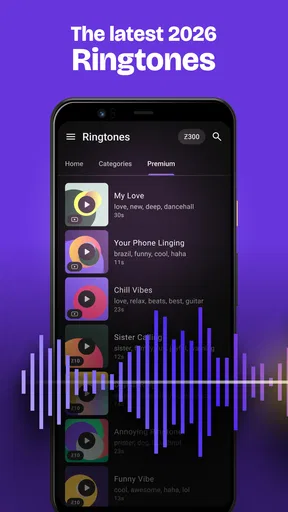
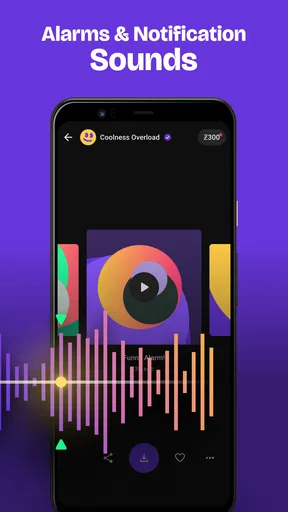
Let's talk about the audio section. The ringtones and notification sounds on Zedge are just as diverse as the wallpapers. You can find anything from classic tones to the latest tunes. It’s like having a DJ in your pocket, ready to change things up whenever you feel like it. No more boring default sounds!
Worth Reading Before You Choose

Flipboard Shows What News Apps Must Do Beyond the Feed

Switching to Android Auto Means Rethinking Your Driving Routine

Google Calendar Makes a Crowded Week Easier to Manage

Ludo King Makes the Most of the Minutes Between Plans

Baby Panda World Brings Quick Play to Modern Phones, but Its Game Library Feels Busy

ESPN’s Live Game View Makes Following Close Games Easier
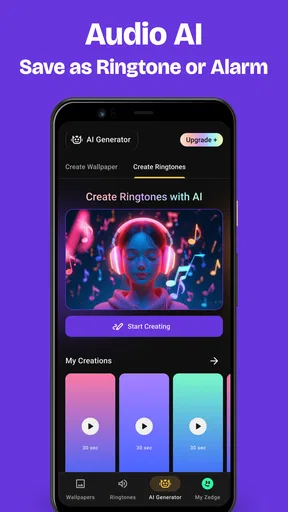
One cool feature I found is the ability to create and customize your own ringtones. With a few taps, you can turn your favorite song into a personalized ringtone. It’s pretty neat and saves you from the hassle of external ringtone makers.
User-Friendly Interface
Navigating through Zedge is a breeze. The interface is intuitive, making it easy to browse through categories and find exactly what you’re looking for. The search function is spot-on, offering quick results based on your input. It’s designed to make your life easier, and I appreciate that.
For a more efficient search, I’d use broad terms to discover a style, then narrow the search once I know what I like. I’d also check that an image works against both the lock screen and the home screen rather than choosing only for its thumbnail. Different screen layouts and icons can change how readable and balanced a wallpaper feels, so a quick preview is more useful than assuming the image will look identical everywhere.
Community and Creativity
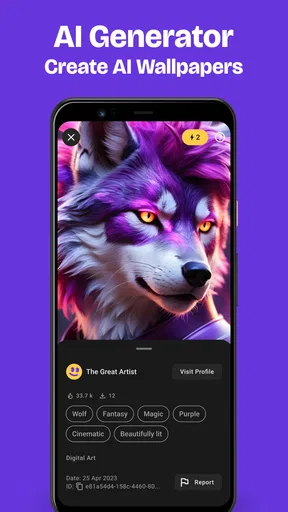
What really sets Zedge apart is its community feature. You can see what’s trending and even share your own creations. It’s like a social network for customization enthusiasts. The app constantly updates its library, so there’s always something new to explore.
That community-led feel is a different proposition from relying only on a phone’s built-in wallpaper gallery. A built-in gallery is usually the simpler option if I want a quick, curated change and don’t care about sound choices. Zedge makes more sense when I want variety across both visuals and audio, or enjoy browsing work shared by other people. The trade-off is that a large, frequently changing catalog can require more filtering to find something that feels personal rather than merely popular.
Another thing worth mentioning is that Zedge has a premium option. While the free version is already packed with features, the premium version offers an ad-free experience and exclusive content. If you’re someone who loves to dive deep into customization, it might be worth considering.
What to consider before settling in
I wouldn’t choose a ringtone solely because it stands out in a preview. A sound that is distinctive in a quiet moment may be intrusive when it repeats through a workday, so I’d favor something recognizable without being startling. Likewise, animated backgrounds can add movement, but a static image is often the calmer choice if I want the screen to feel clean and unobtrusive. The right pick depends on how often I see or hear it, not just its first impression.
It’s also worth separating the free starting point from optional spending. Zedge is free to download, but individual in-app purchases can vary widely in price. I’d browse first, decide whether the free selection already meets my needs, and only then consider paying for something specific. If I mainly want one plain background or a standard alert, the phone’s own options may be enough; paying for a broader catalog would add little value in that case.
Who will get the most from it
I think Zedge is best for people who enjoy changing their phone’s look often, want more choice than the default gallery provides, or like matching a visual style with a sound. It is also appealing to someone who enjoys discovering designs through trends and community creations rather than selecting from a small fixed set. The Teen content rating is useful context for families choosing apps, and I’d still encourage younger users to make purchase decisions carefully.
On the other hand, I’d skip it if I prefer a phone that stays visually consistent, want only a single no-fuss wallpaper, or dislike browsing a broad catalog. Someone who already has a specific image and sound in mind may find it quicker to use their device’s existing tools. Zedge’s value comes from choice and discovery, not from being the only way to customize a phone.
Final Thoughts
Overall, Zedge™ Wallpapers & Ringtones is a must-have app for anyone looking to personalize their device. It’s not just about pretty pictures and catchy tunes; it’s about making your phone feel truly yours. Whether you’re into minimalist designs or the latest pop culture trends, Zedge has you covered. So go ahead, give it a try, and let your phone reflect your unique style.
My recommendation is more measured: it’s worth trying if you enjoy exploring customization, while a built-in gallery is likely better if you want one fast, simple change. The current version is 9.4.1 and supports Android 9 or later. For me, the best reason to keep it around is having visual and sound options together; the best reason to leave it behind is that a huge catalog can be more choice than I need.
Pros
- Extensive collection of wallpapers.
- High-quality ringtones available.
- User-friendly interface design.
- Regular content updates.
- Customizable search filters.
Cons
- Contains ads in free version.
- Some content requires in-app purchases.
- Limited editing options for wallpapers.
- Occasional crashes reported.
- Not all content is unique.
FAQs for Zedge™ Wallpapers & Ringtones
What is Zedge™ and how does it work?
Zedge™ is a popular app that provides users with a vast library of wallpapers, ringtones, and notification sounds. Once downloaded, you can browse through various categories to customize your phone's appearance and sound. The app is user-friendly, allowing you to easily set any wallpaper or ringtone directly from the app.
Is Zedge™ free to use, and are there any in-app purchases?
Zedge™ offers a free version with ads and a limited selection of content. However, for users seeking an ad-free experience and access to premium content, the app offers in-app purchases and subscriptions. This includes exclusive wallpapers and ringtones that enhance personalization options.
Are the wallpapers and ringtones on Zedge™ high quality?
Zedge™ prides itself on providing high-quality wallpapers and ringtones. The wallpapers are available in various resolutions to fit different screen sizes, ensuring clear and vibrant images. Similarly, the ringtones are high quality, offering crisp and clear audio for calls and notifications.
How can I ensure my device's safety while using Zedge™?
Zedge™ is generally considered safe to use. However, it's essential to download the app from trusted sources like the Google Play Store or Apple App Store. Regularly updating the app and reading user reviews can also help ensure a secure experience. Always be cautious with permissions requested by any app.
Can I create my own content on Zedge™?
Yes, Zedge™ allows users to create and upload their own wallpapers and ringtones. This feature lets you share your creativity with the community. Simply follow the guidelines and requirements provided by the app to ensure your content is accepted and enjoyed by other users.


